


Beat Piano Dance:music game
4.4503.00 Reviews
App Specs
- Version
- 2.2.1
- Updated On
- License
- Free
- Downloads
- 50,000,000+
- Developer
- XGAME STUDIO
- Categories
- Music
- Platform
- Android, iOS
Screenshots
 Analysis by AppCompare
I came away from Beat Piano Dance: music game thinking of it as a quick rhythm challenge first and a piano game second. Its appeal is easy to understand: follow the beat, react to the tiles, and try to keep your timing steady. That makes it a natural choice when I want a short burst of play rather than a long session with a story or complicated rules. It is a music game by XGAME STUDIO, and its broad reach is reflected in more than 50 million installs and an average rating of 4.4 from around 302,000 ratings.
How the rhythm feels in play
The basic loop is familiar to anyone who has tried a tile-tapping rhythm game: music plays while notes arrive on screen, and I respond with taps, holds, or swipes as the patterns demand. The early stages make the idea approachable, but the test is not simply tapping quickly. I have to watch what is coming, listen for the pulse, and keep my hands relaxed enough to respond accurately when a pattern gets busier.
That balance is what makes a short session satisfying. When I miss a beat, I can usually tell whether I was looking too far ahead, reacting late, or moving awkwardly. I find it more useful to focus on one clean run than to mash at the screen and hope for a better result. If a section feels difficult, slowing down mentally and tracking the rhythm can help more than trying to move faster.
Readable screens, simple navigation
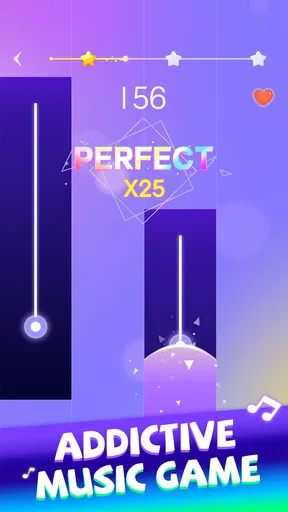
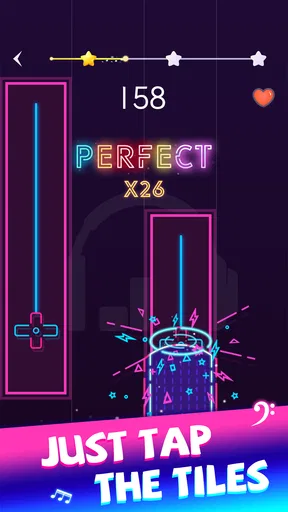
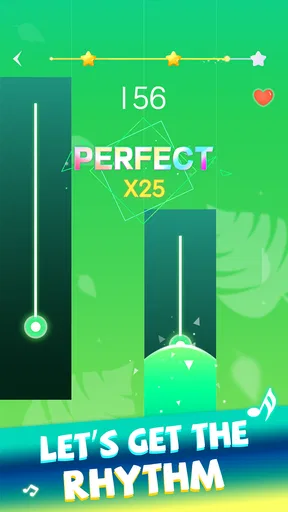
The colorful tiles are easy to distinguish at a glance, and the interface keeps the central task clear: follow the notes. That direct presentation is welcome for a game where attention needs to stay on the moving pattern. The bright visuals also give the play a lively feel, though they may be a little busy for someone who prefers muted screens or is sensitive to animated effects.
I would treat the opening tutorial as a useful orientation rather than proof that every later pattern will feel effortless. It helps explain the basic actions, but new combinations still take practice. A practical approach is to learn one action at a time—first tapping, then holding or swiping when those patterns appear—rather than trying to judge the entire screen at once. The game is rated for Everyone, but that age label does not mean every player will find its pace or visual movement comfortable.
Motor and sensory comfort
Because play depends on timed finger movements, this is not an ideal pick for every physical situation. A player who finds repeated tapping tiring, has limited hand mobility, or needs generous time to react may run into friction as the rhythm becomes more demanding. I would try a brief session and stop if my hand starts to tense; pushing through discomfort makes the timing less reliable and the game less enjoyable.
Sound is central to the experience, so playing with audio makes it easier to feel the beat rather than relying only on visual cues. That can be a drawback in a quiet place, around sleeping people, or for someone who cannot comfortably use sound. In those situations, I would first see whether the game remains understandable at a low volume or with the device muted, rather than assuming the visual rhythm will be an equal substitute. Bright movement and music can also be a lot during a tired moment, so a short session is often the sensible choice.
Worth Reading Before You Choose

Baby Panda World Brings Quick Play to Modern Phones, but Its Game Library Feels Busy

ESPN’s Live Game View Makes Following Close Games Easier

QuizzLand Review: A Good Fit for Short Trivia Breaks, Not Every Player

Basketball Stars: Multiplayer Is Fast, but Can It Recover When Matches Go Wrong?

WEBTOON Turns Phone Updates Into a Better Reading Routine

Link to Windows Runs on Shared Habits, Not Social Feeds
Where it fits into an ordinary day
I can see myself opening it while waiting for an appointment or taking a break at home: one song gives me a clear activity, and I can put the phone away when the moment is over. It is less suited to playing while walking, crossing a street, or doing another task that needs attention. The moving tiles ask me to look at the screen, and the beat rewards concentration; treating it as background entertainment misses what the game is asking from my hands and eyes.
It is also a poor match for a commute if I need to keep a hand free or cannot hear the music clearly. A seated wait is a better fit than a crowded journey where the phone may be jostled. For a quick home session, I can set the device down securely, use a comfortable grip, and play a single track before deciding whether I want another. That small routine is more inviting than turning every spare minute into a high-score chase.
How it compares with other music games
Compared with a conventional piano-learning app, this is built around reaction and score-chasing, not lessons in reading notation or developing piano technique. I would not choose it to learn an instrument. Compared with a music player, it asks me to participate rather than simply listen, which is exactly its advantage when I want an active distraction. And against more elaborate rhythm games with layered controls or longer progression systems, its tile-based premise is easier to grasp, though players seeking deep musical practice may want something more instructive.
The useful trade-off is simplicity versus control. A straightforward pattern makes it easy to start, but it also means the experience depends heavily on whether the current songs and challenge suit my taste and ability. I would choose it for brief, reactive play, not for a carefully structured practice plan or a passive playlist. The store page reports 503 written reviews, a smaller pool than its ratings count, so I would put more weight on whether the tapping style suits me than on expecting every player to describe the same experience.
Who is likely to enjoy it
This game makes the most sense for someone who likes music, quick hand-eye challenges, and the satisfaction of improving a run through practice. Beginners can start with easier patterns, while experienced rhythm-game players can look for a more demanding test. It can also work as a small shared challenge: friends can compare how a song went or compete for a better score, provided everyone is comfortable with the same pace and controls.
I would suggest skipping it if the main goal is piano instruction, if repeated screen tapping is uncomfortable, or if bright motion and timed audio are unwelcome. It is also not the right answer for a player who wants a quiet, hands-free way to enjoy music. Those are not faults that a higher score can fix; they are differences between what this game asks of a player and what that player wants from an app.
Practical details before you start
Beat Piano Dance: music game is free to download, with in-app purchases listed from $2.99 to $24.99 per item. I would begin without buying anything and decide first whether the rhythm format, song selection, and session length work for me. The game is currently version 2.2.0, was released on May 7, 2023, and requires Android 7.0 or later. Its Everyone content rating gives a basic age classification, but parents should still consider whether a child is comfortable with fast visual movement and repeated tapping.
For a fair first try, I would play while seated, with enough time to focus and the sound at a comfortable level. If the screen feels too lively, take a break rather than forcing a longer run; if my fingers tire, I would leave the challenge for later. These small choices matter more here than they would in a music app that only plays songs, because the central activity is active and timed.
My take on its accessibility and value
What I appreciate is that the core idea is easy to understand, so a new player does not have to learn a complicated control scheme before getting started. What I would not assume is that this makes the game equally accessible in every context. Timing, screen attention, moving visuals, and music all shape how comfortable it feels. Trying a short session is the most sensible way to judge that fit for yourself.
For me, the game works best as a lively, optional challenge between other activities. It is not a substitute for lessons, an audio-only music experience, or a game designed around slow and forgiving input. If those distinctions match what you want, the accessible premise and quick play style are appealing. If they do not, choosing a different kind of music app is the better call.
It's time to put on your dancing shoes and get ready to groove with Beat Piano Dance: music game. I recently took this app for a spin, and let me tell you, it's a delightful experience for both music enthusiasts and casual gamers alike. Whether you’re stuck in traffic or lounging at home, this app is sure to brighten your day.
Get Your Groove On
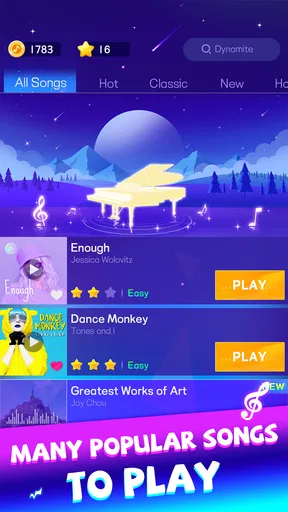
So, what exactly is Beat Piano Dance: music game, you ask? Picture this: a perfect blend of rhythm gaming and piano tiles, where every tap takes you deeper into the music. The game offers a wide range of genres, from classic tunes to the latest pop hits. It’s like having a DJ in your pocket, ready to play your favorite songs on command.
Gameplay That Keeps You Hooked
Let's dive into the gameplay. The app is super intuitive. You start with a basic tutorial that gets you familiar with the controls. Before you know it, you’re tapping tiles in rhythm with the music. It’s a simple concept, but the execution is flawless. As the beats drop, you tap, hold, and swipe. It’s all about timing and precision, and trust me, it’s utterly addictive.
One of the things I love is the variety in difficulty levels. Whether you’re a beginner or a rhythm game veteran, there’s something for everyone. You start easy, but as you progress, the challenge amps up, keeping you on your toes. And the satisfaction of nailing a particularly tough section? Pure bliss!
Visuals and Soundtrack
The visuals are vibrant and engaging, with colorful tiles dancing across the screen. It’s like a light show under your fingertips. The design is sleek, and the interface is user-friendly, making navigation a breeze. But let's be honest, the real hero here is the soundtrack. With an extensive library of tracks, you’re spoiled for choice.
From classical pieces to modern-day chartbusters, the selection is diverse. And the best part? The tracks are updated regularly, so there’s always something new to explore. I found myself discovering new favorites and revisiting old classics, all while improving my rhythm skills.
Why You’ll Love It
The social aspect of the game is another highlight. You can compete with friends or players worldwide, climbing up the leaderboards. It adds a competitive edge that keeps the game exciting. Plus, sharing your high scores on social media is a fun way to show off your skills.
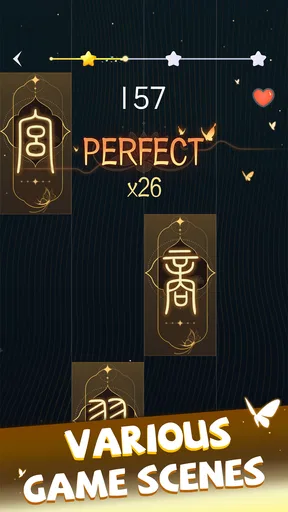
The app also offers customization options. You can personalize your experience by choosing different themes and tile designs. It’s these little touches that make the game feel uniquely yours.
Is It Worth Your Time?
In a word: absolutely. Beat Piano Dance: music game is more than just a game; it’s an experience. Whether you’re a music lover or just looking for something fun to pass the time, this app is a fantastic choice. It's easy to pick up, challenging to master, and endlessly entertaining.
So, give it a whirl, and let the music move you. Who knows, you might just discover your inner rhythm maestro. Download it, and let the beats guide you to a world of musical excitement. Happy tapping!
Pros
- Engaging rhythm gameplay keeps you entertained.
- Wide variety of songs to choose from.
- Visually appealing graphics and animations.
- Easy to learn controls for all ages.
- Regular updates with new content.
Cons
- In-app purchases can be quite pricey.
- Advertisements can interrupt gameplay.
- Requires internet for some features.
- Limited offline song selection.
- May drain battery quickly on older devices.
FAQs for Beat Piano Dance:music game
What is Beat Piano Dance: music game?
Beat Piano Dance is an engaging rhythm-based mobile game where players tap along to the beat of various music tracks. The game combines vibrant visuals with an intuitive interface, making it accessible for all ages. Players can enjoy a wide selection of songs across different genres, enhancing their musical experience.
How do the controls work in Beat Piano Dance?
The controls in Beat Piano Dance are simple and intuitive. Players tap on the screen as notes appear, matching the rhythm of the song. The game requires timing and precision, challenging players to improve their skills with each level. The easy-to-use interface makes it perfect for both beginners and seasoned rhythm game enthusiasts.
Does Beat Piano Dance offer multiplayer options?
Yes, Beat Piano Dance includes multiplayer options where players can compete against friends or other online players. This feature adds a competitive edge to the game, allowing users to challenge others in real-time and climb the leaderboard. It enhances the social aspect of the game, making it more exciting and interactive.
Are there in-app purchases in Beat Piano Dance?
Beat Piano Dance offers in-app purchases that allow players to unlock additional songs, skins, and other premium features. While the game is free to download, these optional purchases provide an enhanced experience for those looking to explore more content or customize their gameplay. Users can enjoy the core game without spending money.
What types of music are available in Beat Piano Dance?
Beat Piano Dance features a diverse range of music genres, including pop, classical, rock, and EDM. This variety ensures that there is something for everyone, catering to different musical tastes. Regular updates often introduce new tracks, keeping the game fresh and exciting for players who enjoy discovering new music.


